
How a Designer Actually Uses AI to Create Click-Worthy Amazon Hero Images

Why Hero Images Are Harder Than They Look Your hero image is your product’s profile picture on Amazon. It’s the single frame standing between a casual scroll and an actual click into your listing. And the truth is, no matter how good your product is, if the hero doesn’t earn the click, the rest of your listing never gets a chance. But here’s where it gets tricky: Amazon has a long list of rules about what a hero image can and can’t be. Those rules exist for a reason. Amazon wants the search results page to feel consistent, trustworthy, and free of misleading visuals. If every seller could plaster text, badges, and lifestyle props all over their main image, the search page would look like a flea market, and buyers would lose trust fast. So before we even talk about AI, these are the non-negotiables you have to design around: Pure white background (RGB 255, 255, 255). Exceptions exist for certain categories (décor, all-white products), but only if competitors in your category are doing it and getting approved. No text, logos, badges, watermarks, or graphic overlays. Your logo can appear if it’s physically on the product or packaging, since that’s part of the product. No additional props that aren’t included in the package. Misleading props lead to returns, bad reviews, and suspended listings. The product must fill at least 80% of the frame. Static image only. No GIFs, no video, no animation. Under 10 MB, exported at 72 PPI (higher PPI doesn’t improve digital rendering, it just inflates file size). Now layer on top of that the real challenge: your hero has to follow all those rules and out-click every competitor on the search page. That’s the part most sellers underestimate. A “compliant” hero image is just the floor. A click-worthy hero image is the goal. That’s where AI has genuinely changed how I work. How I Actually Use AI in My Hero Image Workflow I want to be upfront here: AI does not make hero images for me. It’s not a “type a prompt, get a finished listing image” button. Anyone who tells you that has either never had a listing rejected or has never had to hit a real conversion target. What AI does do is collapse the parts of my workflow that used to eat hours: cleaning up client-supplied product photos, generating better base assets, and exploring composition ideas before I commit to a final direction. Beauty is one of the niches we work in most, so most of what follows comes from that world (bottles, tubes, jars, palettes, droppers), but the same tactics translate to supplements, food and beverage, home goods, and anything else where the product itself has to carry the frame. Here are the five things I’m actually doing with AI on almost every project. 1.TurningFlat Photos Into 3D-Render-Style Images This is the highest-impact tactic in the entire workflow. Most clients send phone photos. A few send proper studio photos. Almost none send true 3D renders, because 3D renders are expensive and slow: typically a few hundred dollars per angle and a week of turnaround. What I do instead: I use the client’s flat photo as the reference and prompt the AI (ChatGPT with image editing, or Nano Banana for tricky product detail) to re-render it in a clean studio style. Soft three-point lighting. A subtle contact shadow. Crisp edges. The kind of look that used to require a $400 render. The prompt I actually use, roughly: “Re-render this product as a studio product photograph on a pure white background. Soft three-point lighting, subtle contact shadow directly below the product, sharp focus on the label, neutral white balance. Preserve the exact label artwork, typography, and product proportions.” The “preserve” instruction is critical. Without it, AI will quietly redesign your client’s label, and you won’t notice until the client does. This works best for: matte products, plastic and cardboard packaging, fabric, food items. This works worst for: highly reflective surfaces (mirrors, polished metal, glass). For those, a real 3D render still wins. AI struggles to make reflections physically coherent, and Amazon buyers can tell when something looks “off” even if they can’t articulate why. 2.Removingand Replacing Backgrounds The old workflow was twenty minutes of pen-tool work per product, plus another ten cleaning up the edges around hair, fuzz, translucent caps, and soft shadows. Now it’s about ninety seconds. I still don’t trust one-click background removers for the final file. They tend to mangle edges on translucent or wispy elements. My actual workflow: AI-based remover for the first pass (any of the modern ones, they’re all roughly equivalent now). Manual edge cleanup in Photoshop on the trouble spots: translucent caps, glass, anything with a soft drop-off. Re-composite onto pure white with a proper contact shadow rebuilt by hand. AI-generated shadows almost always look wrong at this stage: too dark, wrong angle, wrong softness. The 90 seconds saved on extraction is the whole point. It frees up the time I used to spend on mechanical work for the part of the job that actually moves conversion: composition and concept. 3.RelightingProduct Photos This is the one I lean on most for beauty clients, because beauty products live or die on how the surface looks. A flat, evenly-lit phone photo of a moisturizer jar reads as “drugstore.” The same jar with proper dimensional lighting reads as “premium,” and the buyer makes that judgment in well under a second. What I do: take the original photo, prompt the AI to relight it with a specific lighting setup. I’m specific about the setup because vague prompts give vague results. Lighting setups I use a lot: “Soft key light from the upper left, gentle fill from the right, subtle rim light to separate from the background.” Default for most products. Looks like a competent studio shot. “Dramatic side lighting with deep shadow on the opposite side, suitable for a premium skincare product.” Good for higher-end beauty and fragrance. “Bright, even, slightly cool lighting like a clinical product photograph.” Good for medical-adjacent, supplements, anything where “trustworthy” beats “luxurious.” Same rule as before: tell the AI to preserve the label artwork. Tell it explicitly. Twice. 4.UpscalingLow-Res Client Photos About a third of the photos I receive are too small to use. 800 pixels wide. JPEG compression artifacts. Sometimes a screenshot of a screenshot. In the past, that meant going back to the client and asking for the original files, which would take a week if I got them at all. Now I upscale in one of the dedicated upscaling tools (Topaz, Magnific, or whatever’s working well that month, since this space changes fast), and then do a sharpening pass on the label. A note that matters: upscaling invents detail. On the body of the product, that’s fine. On the label, it can quietly change letters, ingredients, or numbers. Always compare the upscaled label against a clear reference photo of the real product before shipping. For supplements, beauty, and anything with regulated claims, this isn’t optional. 5.GeneratingTexture and Ingredient Elements This is where AI is genuinely magical, and where I get to do the composition work that used to require a real photo shoot. For a keratin treatment hero, I want the actual ingredients on the label (coconut, inca oil, and the golden keratin liquid itself) visible around the bottle. In the old workflow, that meant either sourcing stock photos that never quite matched, or buying the physical ingredients and shooting them. Now I generate them. For a moisturizer, I want a swatch of the actual cream texture next to the jar. Generated. For a serum, I want a single droplet caught mid-fall with the right viscosity. Generated. The rule I follow religiously: the element I generate has to correspond to something that’s actually inside the product or stated on the label. Argan oil on the label means I can put argan oil in the frame. A vague “natural” claim does not give me license to put a forest behind the bottle. This is the line between “stand out” and “misleading,” and Amazon (and your buyers) can tell the difference. Standing Out on the Search Page Without Breaking the Rules This is where the strategy gets fun, and where most sellers get it wrong. The mistake people make is thinking “stand out” means “add stuff.” More props, more colors, more elements. But Amazon will reject most of that, and even when
How to Change Your Amazon Browse Node and Recover Lost Rankings

A seller opens a support case after organic rankings drop across a listing with clean copy, strong reviews, and no compliance flags. Amazon closes the case. The listing is active. Nothing is wrong. Performance stays flat because nothing is wrong in the ways Amazon checks. The browse node had shifted to a parent category during a backend update, and the listing had been excluded from the filtered search results where buyers convert. No error. No alert. Just consistent underperformance that looks like a content problem. Check the browse node before adjusting anything else. The browse node is the numerical identifier that places your product within Amazon’s category tree. It determines keyword indexing eligibility, Best Seller Rank calculation, and category-level ad targeting. Salesforce research on intent-aware search shows that around 80% of AI-driven search decisions are shaped by category and contextual signals. On Amazon, the browse node is that signal. A wrong assignment does not produce an error. It produces quiet, consistent underperformance that looks like a content problem when it is actually a structural one. This guide covers how to identify a browse node problem, how to change it, and how to protect the assignment from reverting. If you are new to how Amazon works as a selling platform, How Does Amazon Seller Work? What Brands Need to Know Before Entering the U.S. Market covers the foundational mechanics that make category placement this consequential. What Is an Amazon Browse Node and Why Does It Matter A browse node is a numerical ID that positions your product within Amazon’s category hierarchy. The structure runs from a broad root category down through subcategories to a leaf node, which is the most specific level. Your product’s primary leaf node is where Amazon places it for search classification purposes. The node is not just a label. It is an input into three systems that directly affect revenue. First, keyword indexing. Amazon uses category context to determine which search terms a listing is eligible to rank for. A product in the wrong node may not be indexed for the keywords it should own, even if those keywords appear in the title and bullet points. Second, Best Seller Rank. BSR is calculated within the assigned category. A wrong node means BSR reflects performance in the wrong competitive set, which weakens the ranking signal over time. Third, ad targeting eligibility. Amazon’s category targeting for Sponsored Products and Sponsored Display maps directly to browse node assignments. A product in the wrong node may be excluded from relevant category audiences or included in irrelevant ones. Three Data Signals That Suggest a Browse Node Problem A browse node issue rarely announces itself. It shows up as a performance pattern that looks like something else. These are the three most common signals worth checking before concluding that copy or bids are the issue. Your BSR is in a category that does not reflect your actual competition If your Best Seller Rank appears in a category that does not match where your competitors rank, that is a direct indicator of a node mismatch. Pull up your detail page and look at the BSR section. Then search your main keyword and check which categories the top organic results show BSR in. If you are ranking in a different category than the products you are competing against, you are in the wrong node. Keywords you should own are not generating impressions Run a search term report from your Sponsored Products campaigns and compare it against the keywords you expect to index for organically. If high-intent keywords for your product are generating zero or near-zero organic impressions despite being present in your listing copy, keyword indexing may be suppressed by a category mismatch. Amazon’s indexing system uses category signals alongside listing content to determine relevance. A product in the wrong node is fighting the algorithm on relevance even when the copy is right. Category targeting campaigns are underperforming relative to keyword campaigns If your keyword campaigns are generating reasonable results but your category targeting campaigns are consistently underdelivering or targeting audiences that do not convert, your node assignment is worth investigating. Category targeting audiences are built from browse node trees. A product placed in the wrong node will be served to the wrong audience in category-based campaigns, regardless of how well the creative is optimized. How to Verify Your Current Browse Node Assignment Before changing anything, confirm the current assignment and whether it is actually wrong. Step 1: Check your assigned node in Seller Central Go to Inventory, then Manage All Inventory, then click Edit on the listing. Under the Vital Info tab, look at the Item Type Keyword and the assigned category. Note what category is shown. Then go to your live detail page on Amazon.com and scroll to the product details section. The category breadcrumb shown there reflects the actual browse node your product is sitting in. These two can differ. Check both. Step 2: Run the Product Classifier In Seller Central, navigate to Inventory, then Add Products via Upload, then Product Classifier. Enter your product keywords and attributes. The tool will return the most appropriate browse node based on Amazon’s current taxonomy. If the suggested node differs from your current assignment, that gap is worth investigating. The Product Classifier reflects how Amazon’s system would categorize your product based on what it is, not based on what you originally selected. Step 3: Download and cross-reference the Browse Tree Guide The Amazon Browse Tree Guide is the official taxonomy reference. Download it from Seller Central under Inventory, then Inventory File Templates, then Browse Tree Guide. It lists every valid node ID, the attributes required for each, and the hierarchy they sit within. Confirm that your current node ID appears in the BTG as a valid leaf node for your product type. If you are assigned to a parent node rather than a leaf node, or to a node that requires attributes your product does not have, that is a fixable structural problem. Step 4: Benchmark against top
ChatGPT Product Recommendations: How Shopify Brands Can Optimize for AI-Powered Discovery.
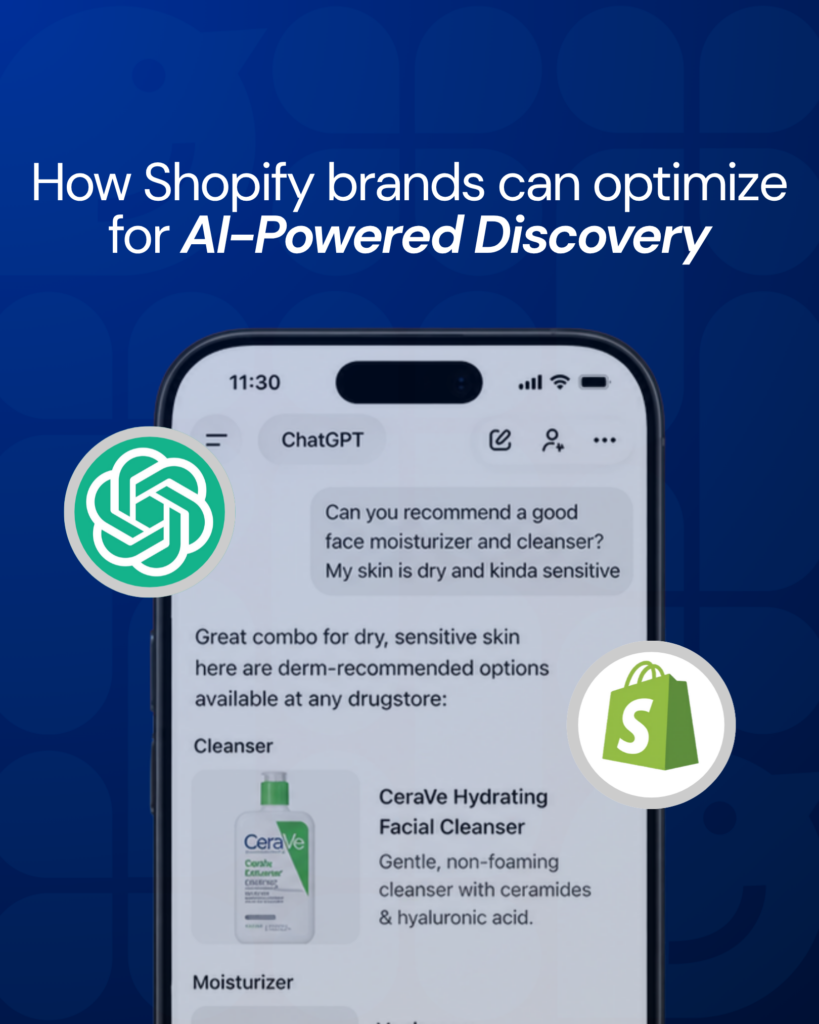
ChatGPT can now recommend products directly inside a conversation. A user asks what moisturizer works best for sensitive skin, and ChatGPT surfaces options, compares them, and guides the decision, with the purchase completing through the merchant’s storefront inside an integrated experience. OpenAI and Shopify announced this integration officially, marking a meaningful addition to how product discovery can happen inside a conversational interface. The brands appearing in those recommendations are not there by luck. ChatGPT pulls from product titles, descriptions, structured data, review signals, and brand authority across the web to decide what to surface. If those signals are weak, inconsistent, or missing, the brand does not appear, regardless of how well its SEO is performing. This article explains how the Shopify and ChatGPT integration works, how ChatGPT selects which products to recommend, and what ecommerce brands need to optimize to be visible in AI-powered product discovery. It builds directly on the framework covered in From Search to Selection: Brand Discoverability in the Age of AI and Zero-Click Experience: discovery has shifted from something consumers actively explore to something AI systems increasingly resolve for them. What the Shopify and ChatGPT Integration Actually Does The Shopify and ChatGPT integration allows ChatGPT to surface product listings from Shopify merchants directly inside a conversational interface. When a user asks a product-related question, ChatGPT can retrieve relevant products, display them with images and pricing, and enable purchase without redirecting the user to a separate browser tab or website. Industry analysis of the integration, including commentary from Forbes Tech Council, points to a meaningful shift in how the ecommerce funnel works. The moment of discovery and the moment of purchase increasingly coexist inside a single conversational exchange, compressing the traditional awareness to consideration to purchase journey. For ecommerce brands, the practical implication is growing in relevance. Visibility in ChatGPT’s product recommendations is becoming a meaningful part of how purchase decisions get made. A brand that does not appear in relevant AI queries is missing from a channel that is growing in influence. Based on what has been announced, the integration draws from publicly available product data. How exactly ChatGPT selects and ranks products within those results is not fully documented, but the signals that tend to matter follow the same logic as other AI-driven discovery environments. How ChatGPT Appears to Select Products to Recommend ChatGPT does not rank products the way a search engine ranks pages. Based on how AI language models work in practice, selection tends to favor products whose information most clearly matches the intent expressed in the query. The product with the clearest, most relevant description is more likely to be surfaced than one with stronger keyword density. A search engine evaluates pages based on keyword relevance, backlinks, and technical signals. ChatGPT evaluates products based on how clearly and accurately the product information answers the question being asked. That distinction matters for how brands approach optimization. The signals that tend to influence AI product selection include: Product titles: whether they clearly describe what the product is and who it is for, in natural language. Product descriptions: whether they answer real buyer questions directly, with benefit-led language rather than keyword density. Structured data and metadata: whether product attributes are consistently defined and machine-readable across platforms. Review signals: volume, recency, and sentiment, including how reviewers describe the product in their own words. Brand authority signals: how consistently and accurately the brand is described across third-party sources, directories, and the broader web. This signal architecture is the same one that determines visibility across all AI-driven discovery environments, not just ChatGPT. The seven most common gaps brands have in these signals are covered in 7 AI Visibility Mistakes Brands Make When They Rely on SEO Signals Alone. The Shopify integration makes those gaps more consequential because the missed recommendation is increasingly also a missed opportunity to influence the purchase decision. What Ecommerce Brands Need to Optimize for AI Product Discovery Optimizing for AI product discovery requires a different approach than traditional SEO. The goal is not to rank for keywords. It is to make the product information clear enough for an AI system to confidently select and recommend it in response to a relevant query. Product titles should answer what the product is and who it is for A product title optimized for search might read: “Moisturizer SPF 30 Face Cream Anti-Aging Hydrating.” That construction front-loads keywords but reads poorly as a natural description. A product title optimized for AI recommendation reads: “Daily Face Moisturizer with SPF 30 for Sensitive Skin.” It answers the buyer’s question directly: what is this product, and is it for me. The distinction matters because ChatGPT is interpreting meaning, not matching keywords. A title that communicates clearly in natural language is more likely to be selected for a relevant query than one optimized for search density alone. Product descriptions should answer real buyer questions directly AI systems extract answers from content. A description that leads with a direct answer to the most common buyer question, then provides supporting detail, is structured for AI extraction. For a moisturizer, that means leading with what skin type it is designed for and what it does, before expanding on ingredients, texture, and application. The structure mirrors how a knowledgeable salesperson would answer the question, not how a copywriter would write for a product page. Benefit-led language performs better than feature-led language in AI contexts because benefits map more directly to the intent expressed in a buyer’s query. A buyer asking for a moisturizer for sensitive skin is expressing a need, and the description that most clearly addresses that need is the one that gets surfaced. Structured data must be complete and consistent across platforms ChatGPT reads structured product data to understand attributes like category, price, availability, and specifications. Incomplete or inconsistent structured data creates ambiguity that reduces confidence in the product as a recommendation. For Shopify merchants, this means ensuring that product type, tags, metafields, and variant data are complete and consistently applied. It
What Your Dashboard Isn’t Measuring
Early on, most founders treat brand building like something they’ll eventually get around to. Something for later. After the next launch. After the operational chaos settles down. After revenue feels more predictable. But the chaos never fully settles. The urgent work never stops. And “later” rarely comes. After years of working with ecommerce brands at every stage of growth, one thing becomes impossible to ignore: The brands that last aren’t the ones that decided to build a brand someday. They’re the ones that treated brand building as part of the job from day one. The harder question is understanding why so many founders resist that idea in the first place. The Trap That Feels Like Progress Every week, there’s a new tactic promising faster growth. A viral content formula. A platform update. An AI tool that cuts production time in half. A growth hack someone claims generated thousands in sales overnight. And most of them actually work. That’s what makes them dangerous. They work just enough to create the feeling of momentum. A campaign spikes conversions. A new channel drives traffic. A tool improves efficiency. A trend creates short-term lift. None of it is fake. The results are real. The metrics move. But focusing exclusively on what produces immediate results can quietly pull a business away from the position it needs to own long term. Because building a durable brand requires operating on two timelines at once: The timeline generating revenue today The timeline determining whether the business still matters five years from now And the short-term timeline is always louder. It’s measurable. Immediate. Rewarding. The long-term one is quieter, but infinitely more important. The work generating revenue today will always demand your attention. The work protecting your relevance tomorrow rarely does. The Cost You Don’t Notice Until It’s Expensive The biggest risk in ignoring brand positioning is that the damage happens slowly. You can spend years chasing trends, optimizing ads, testing channels, and riding short-term wins while revenue continues growing. From the outside, everything looks healthy. But underneath the numbers, the market is shifting. Competitors are building authority. Customer trust is consolidating around recognizable names. Positioning gaps widen quietly over time. And most dashboards never show it. By the time you feel the effects, catching up no longer takes months. It takes years. What Brand Actually Means Brand is perception. That’s it. It’s what people associate with your business when you’re not in the room. It’s your voice. Your point of view. Your reputation. Your consistency. Your authority in the conversations that matter to your market. A brand is not a logo. It’s not a polished Shopify theme. It’s not a perfectly curated color palette. Those things are accessible to everyone now. With the right tools, especially AI, almost any business can look polished overnight. But credibility cannot be generated overnight. Authority is built through accumulated experience, earned trust, strong positioning, and repeated proof over time. The real question isn’t whether your brand looks good. It’s whether people trust what your brand says when it speaks. Why AI Is Accelerating This Shift AI has dramatically compressed the timeline. When every brand can generate clean visuals, polished copy, and endless content at scale, surface-level differentiation disappears. And businesses without a clear position don’t just blend in. They become invisible. As AI floods every channel with similar-looking content, buyers rely more heavily on trust signals and brand familiarity to make decisions quickly. Brand becomes the shortcut. The difference between being compared… and being chosen instantly. Over the next few years, many brands will see conversion rates become harder to sustain. Trust will decline across crowded categories. Consumers will become more skeptical of generic marketing and interchangeable messaging. The brands that maintain leverage won’t necessarily be the ones with the best AI tools. They’ll be the ones that built something AI can’t replicate: Real authority Clear positioning Distinct perspective Earned trust The Decision Most Brands Delay Too Long The urgent work never ends. The quiet season never arrives. And the next three years pass whether you prepare for them or not. The question isn’t whether you have time to think about positioning. The question is whether you’re willing to build the thing that protects everything else later. The founders who sustain growth long term usually aren’t the ones chasing every tactic. They’re the ones who made positioning part of how the business operates. Not something they planned to focus on “eventually.” Because eventually rarely comes. There’s only the decision to start anyway. Not sure what position your brand currently holds in the market? HatchEcom’s Brand Intelligence service analyzes how your brand is perceived by customers, AI systems, and competitors — giving you a clearer picture of where your positioning stands today and where it needs to evolve next.
Holiday Shopping vs. AI Shopping: How the Customer Journey Really Works Now

Discover how AI is transforming holiday shopping in 2025, shifting from traditional search to personalized, conversational recommendations. Learn how brands can adapt to thrive in this new landscape.
How To Find Your Piece in the World’s Biggest Market

Discover how to successfully enter the U.S. market with essential strategies, in-depth research, and targeted analysis for international companies.
What Does ChatGPT Say About Your Brand? A Step-by-Step Audit Guide
Discover how to audit your brand’s visibility on ChatGPT with a step-by-step guide, ensuring accurate representation and competitive advantage in the AI landscape.
The Small Team Playbook for Scaling Amazon

Discover how small Amazon sellers can scale their businesses effectively by optimizing listings, leveraging automation, and making strategic outsourcing decisions.
Q2 Is Already Here. Here Is How to Plan What Is Next

Learn how to strategically plan Q2 by connecting Mother’s Day, Memorial Day, and graduation season for optimal ecommerce success.
US Market Opportunity Assessment: The Question That Changes How You Plan

Discover how a detailed US market opportunity assessment can shape your brand’s entry strategy and ensure successful market penetration with actionable insights and structured planning steps.